How Sensitive Data is Handled
This page explains how passwords, tokens, JDBC connection strings, and other secret fields are handled — from when you save them in the portal to when connectors run in your cluster.
Where sensitive fields can be stored
This page describes a Partially Managed (D2P) or Self-Managed plane, where the connectors run in your cloud account. For a Trust3 AI Cloud plane, see Trust3 AI Cloud planes.
When you create or edit a Runtime Plane, the portal shows which secret stores your runtime plane deployment type supports. That choice defines where secret material ultimately lives and what connector forms ask for (actual values versus secret store references only).
Secret store options at a glance
| Secret store | What it means |
|---|---|
| Trust3AI Cloud | Sensitive data goes into the portal. A per-runtime-plane key pair managed by Trust3AI takes care of encryption in the portal and decryption in your cluster — full flow. |
| Kubernetes | Sensitive data in Kubernetes Secrets in your namespace; connectors use Kubernetes secret references (name/key). |
| Cloud native | Sensitive data in your cloud secret manager (for example AWS Secrets Manager, Azure Key Vault, Google Cloud Secret Manager); connectors use cloud secret store references. |
1. Trust3AI Cloud
You enter sensitive data in the portal (connector and related forms). A per-runtime-plane key pair, managed as part of the Trust3AI flow, encrypts values before they are persisted so Runtime Manager holds just the encrypted text, and decryption runs in your cluster when the connectors need plaintext secret values. The step-by-step view is in End-to-end protection.
You still complete portal-driven provisioning once so the private key exists where the connector can use it — see Private Key (Encryption).
2. Kubernetes
You create Kubernetes Secrets with sensitive data in your runtime plane namespace.
Runtime plane setup — In the creation wizard or edit flow of the runtime plane, select this secret store option and provide the secret name so the connector can reach your Secrets — follow the instructions on the portal.
Connector configuration — Use Kubernetes secret references (secret key) for sensitive properties so workloads read from the Secret objects you maintain, instead of treating the portal as the long-term home for raw secret text.
3. Cloud native
You create a cloud secret manager with sensitive data in your cloud account (for example AWS Secrets Manager, Azure Key Vault, or Google Cloud Secret Manager).
Runtime plane setup — Connect the runtime plane to that store (region, IAM or workload identity, vault URI, or similar — follow the instructions in the portal) so the connectors are allowed to resolve secrets at runtime.
Connector configuration — Provide cloud secret store references, not the raw secret. The connectors resolve the value when the workloads need it.
Know what counts as sensitive data
Examples include:
- Database and warehouse passwords (Snowflake, JDBC URLs and similar).
- API tokens and private keys used in connector configuration.
- Any field the product marks as a secret.
We treat these values as too risky for open logs, open UI fields, or long-term plain storage outside your trust zone.
Follow the end-to-end protection story
The diagram below applies when sensitive values are encrypted and managed through Trust3AI Cloud (not when you only store a reference to an external vault — those paths resolve inside your cluster using the reference you configured).
Think of a secret as configuration your connectors must read. Encrypted text is stored on the control plane; plaintext is recovered only where you placed the private key and where the agent and connectors run.
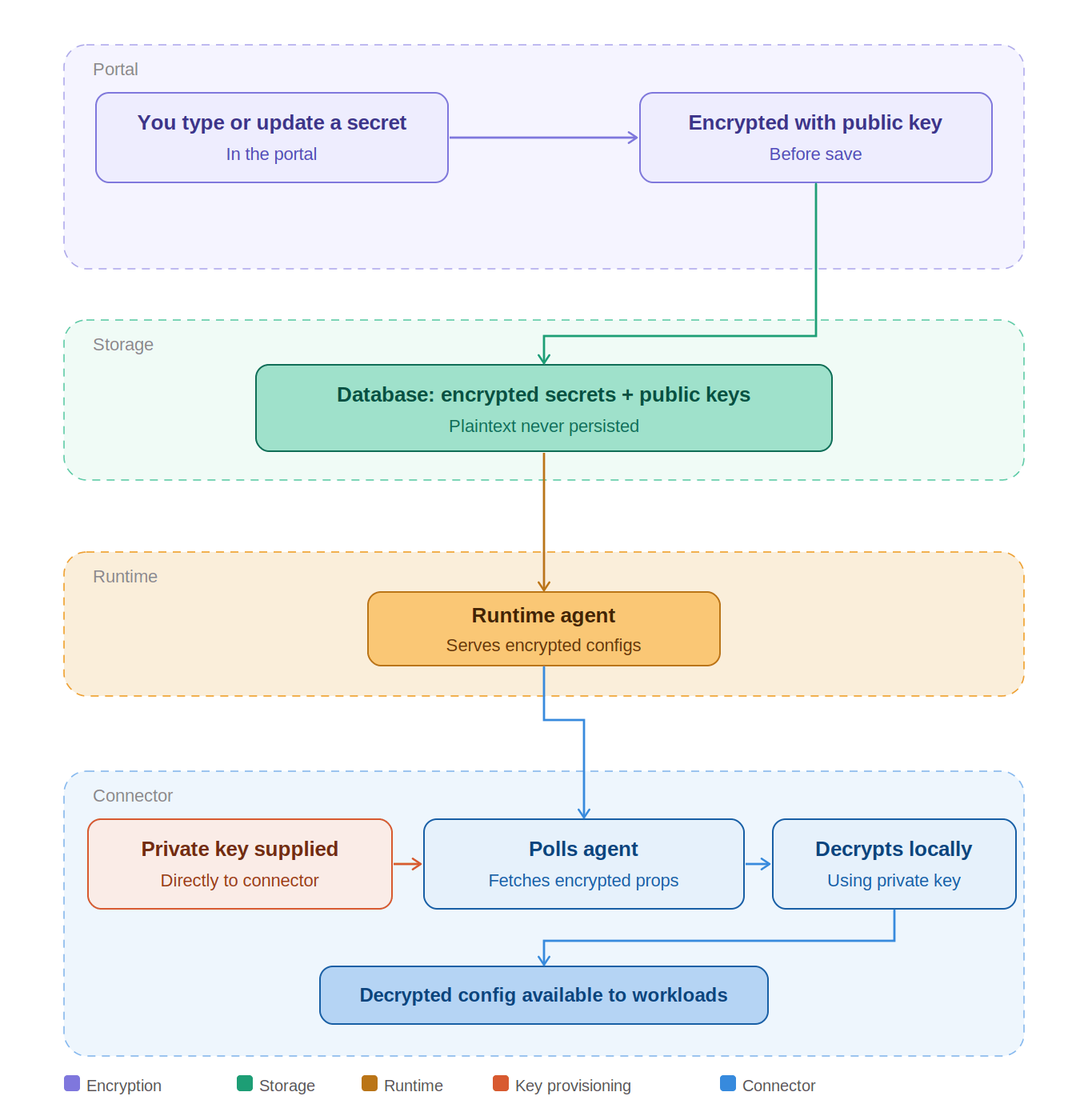
Bottom line: For this model we do not keep readable connector secrets on our control plane. You hold the key material that turns encrypted text back into usable secrets inside your boundary.
Trust3 AI Cloud planes
On a Trust3 AI Cloud plane the connectors run in Trust3AICloud, not in your cloud account, so the split this page describes does not apply: there is no cluster of yours to decrypt secrets in and no Kubernetes Secret of yours to reference.
- Connector secrets are entered in the portal and stored encrypted, and they are decrypted in Trust3AICloud when a connector needs them.
- The key material — the Runtime Agent API key and the RSA key pair — is issued, stored encrypted, and managed by Trust3AI. Nothing is shown once for you to copy and keep, and there is nothing for you to lose.
- You do not hold the private key. The end-to-end protection story above, where plaintext is recovered only inside your own boundary, describes D2P and Self-Managed planes.
If your policy requires that connector credentials never leave your cloud account, use a Partially Managed (D2P) or Self-Managed plane. See Deployment Options.
Trust3AI Managed keys
This section describes Partially Managed (D2P) and Self-Managed planes. For each such Runtime Plane, Trust3AI issues credentials that sit outside your connector passwords: an API key for traffic between Runtime Manager and the Runtime Agent, and an RSA key pair so connector secrets can be stored as encrypted text on the control plane and decrypted in your cluster (for the agent and connector workloads).
The portal shows each credential only when it is first created. After provisioning, these keys are stored typically in Kubernetes Secrets in your runtime plane namespace — do not delete those Secrets casually; losing them can force Regenerate for the API key or a recovery/rebuild path for encryption material — see Private Key (Encryption).
API Key
The API key tells Runtime Manager which Runtime Agent is calling. It is not a warehouse password, JDBC password, or cloud vault secret.
The portal displays the full API key once at create time, and again only after you click Regenerate.
If the key is lost or compromised, click Regenerate in the portal, then update every agent that used the old value using the portal’s steps for your environment. Trust3AI cannot provide you a copy of the old key.
Private Key (Encryption)
Each runtime plane that uses the Trust3AI Cloud secret store has one RSA key pair for encrypting sensitive connector fields:
- The public key encrypts values before they are sent for storage.
- The private key decrypts encrypted text inside your cluster when the connectors need plaintext.
The portal shows the private key once when the plane is created.
There is no portal action today to rotate this RSA pair the way you can Regenerate the API key. If the private key stored in the Kubernetes cluster is lost without a backup, existing encrypted text for that plane cannot be unlocked from the portal alone.
When you delete the runtime plane, the RSA material for that plane is revoked on the control plane side for current product behavior.
Treat API key regeneration like maintenance
Until the agent is updated with the new API key, anything still using the old API key stops immediately. Regenerate affects only the API key; it does not rotate the RSA key pair used for connector secret encryption.
- Prev topic: Getting Started
- Next topic: Runtime API Reference