Runtime Plane Deployment Options
Overview
A runtime plane can be deployed in three ways. They differ in where the control plane runs, where the connectors run, and who operates it.
- Trust3 AI Cloud — everything runs in Trust3AICloud, connectors included. Nothing runs in your cloud account and there is nothing to install.
- Partially Managed (D2P) — Trust3AI runs the control plane in Trust3AICloud; only the Runtime Agent and connectors run in your cloud account.
- Self-Managed — the entire stack, including the control plane, runs inside your own cloud account.
You choose between Partially Managed (D2P) and Self-Managed when you create the runtime plane in the portal (Settings → Runtime Plane). The portal guides the rest and generates the exact install commands for your cluster, so the sections below stay at an overview level. Trust3 AI Cloud is not an option in that form — Trust3AI enables it for your account and the plane appears ready to use.
Deployment types
The entire stack runs in Trust3AICloud — the control plane (Runtime Manager, Policy Manager, Audit Server, Portal) and the connector workloads. Nothing runs in your cloud account. There is no cluster to provide, no Helm command to run, no database, and no IAM role. Trust3AI operates all of it and the connectors reach out to your data platforms.
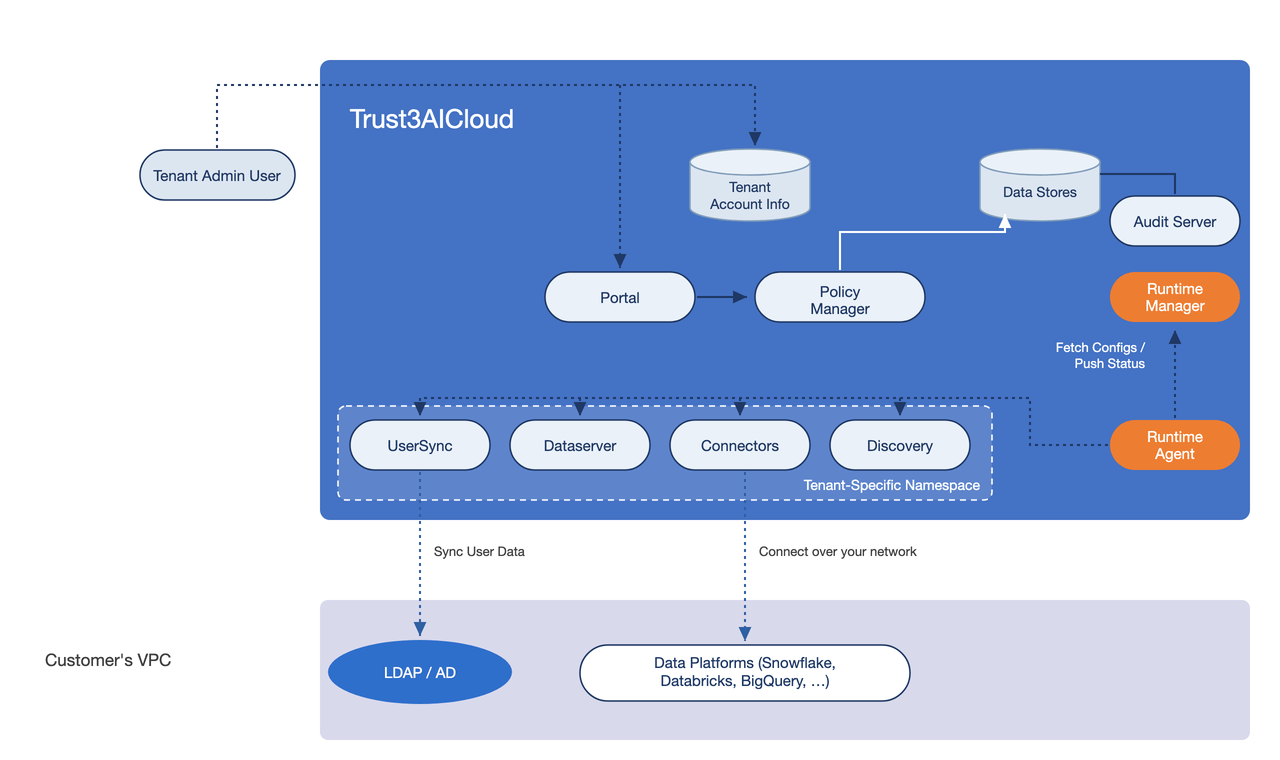
- Runs in Trust3AICloud: the control plane plus connectors, UserSync, Dataserver, and Discovery.
- Runs in your account: nothing.
- You provide: connector credentials, and network access from Trust3AICloud to your data platforms.
- Provisioning: none. Trust3AI enables the plane for your account and it appears in Settings → Runtime Plane as Trust3 AI Cloud. Once it is Active, open it and add connectors from the Connector tab.
Check these two before choosing it
Reachability — your data platforms must accept connections from Trust3AICloud. A data source that only accepts connections from inside your own network needs Partially Managed (D2P) or Self-Managed.
Residency — connector credentials, and the keys that protect them, are held in Trust3AICloud in encrypted format rather than in your account. See Trust3 AI Cloud planes.
Connector coverage — fewer connectors are available than on the other two types today. See the Support Matrix.
The control plane — Runtime Manager, Policy Manager, Audit Server, and Portal — stays in Trust3AICloud. Only the Runtime Agent and the connector workloads run in your cloud account, in a Kubernetes namespace you provide. Trust3AI operates and updates the control plane; you operate the runtime plane in your VPC. The agent polls the control plane for configuration and pushes status back; your data and connector credentials stay in your account.
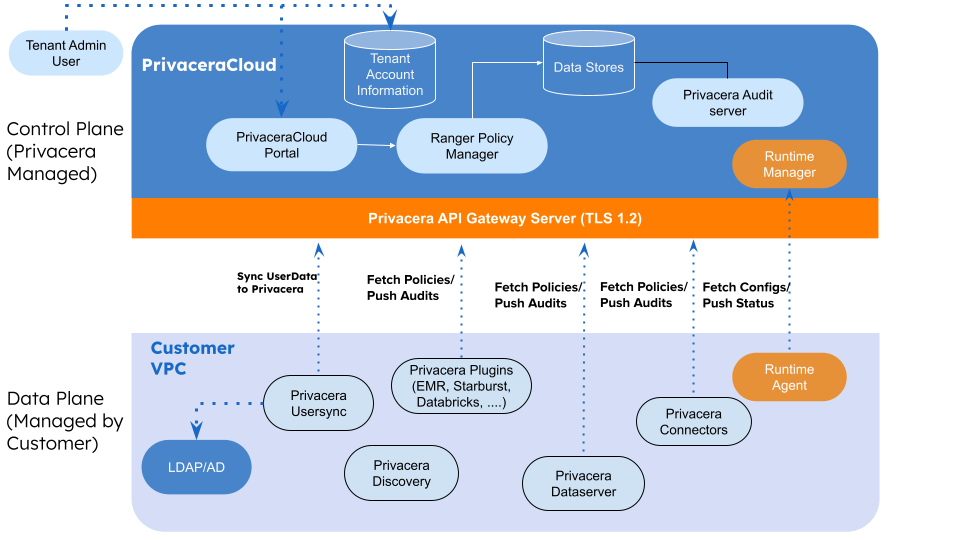
- Runs in your account: Runtime Agent, connectors, UserSync, Dataserver, Discovery, engine plugins.
- Runs in Trust3AICloud: Runtime Manager, Policy Manager, Audit Server, Portal.
- Cloud providers: AWS (EKS), Azure (AKS), or Google Cloud (GKE).
- You provide: a Kubernetes cluster and namespace.
- Provisioning: the portal generates a values download and a Helm command that installs the agent into your namespace.
The entire stack runs inside your own cloud account: the control plane (Runtime Manager, Policy Manager, Audit Server, Portal) and the Runtime Agent and connectors. You also provide and operate the surrounding infrastructure. Trust3AI supplies the charts and configuration; you deploy and run everything, so nothing leaves your network.
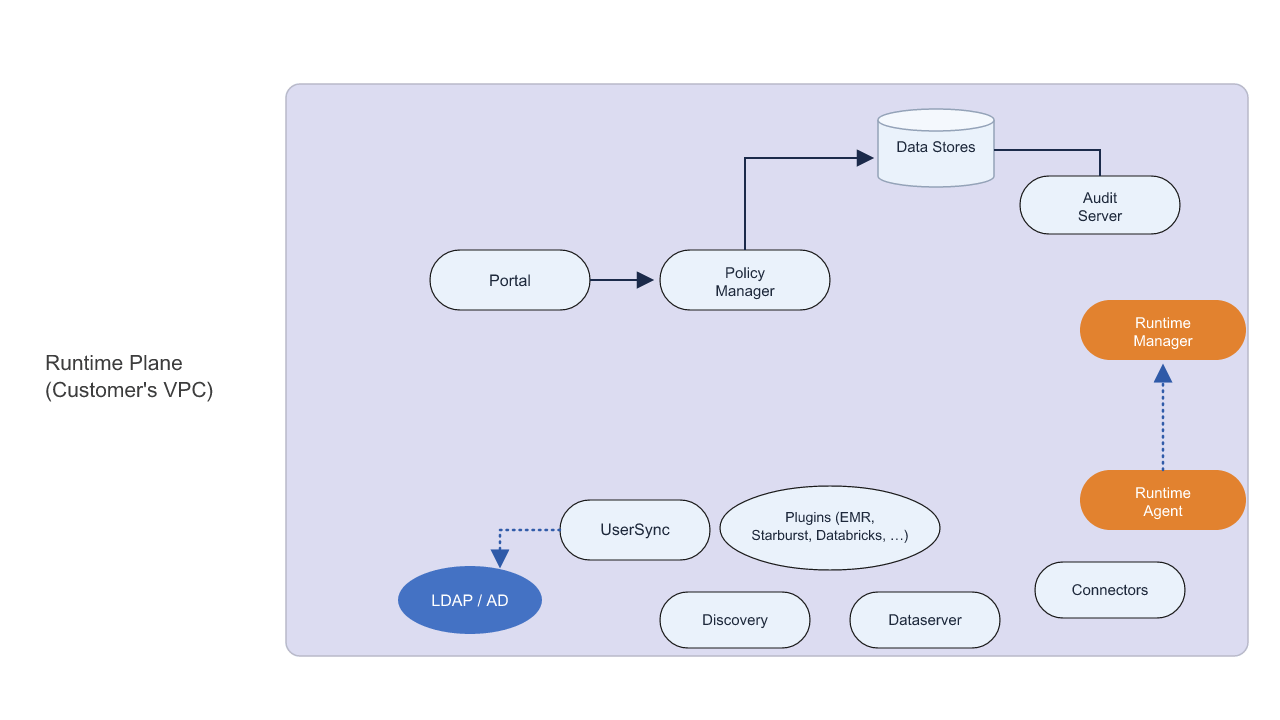
- Runs in your account: the control plane plus the Runtime Agent, connectors, UserSync, Dataserver, Discovery, and engine plugins.
- Cloud provider: AWS (Amazon EKS).
- You provide: the EKS cluster plus S3, persistent storage (EBS by default, or EFS), a database, Route 53 DNS, ALB/ACM ingress, and an IAM role.
- Provisioning: the portal wizard collects your infrastructure, storage and connectivity, and cloud permissions, then generates the values and platform-bundle downloads and a Helm command. After the pods are running, you open your own in-cluster portal.
Comparison
| Trust3 AI Cloud | Partially Managed (D2P) | Self-Managed | |
|---|---|---|---|
| Control plane location | Trust3AICloud | Trust3AICloud | Your cloud account (EKS) |
| Runtime Agent & connectors | Trust3AICloud | Your cloud account | Your cloud account |
| Who operates the control plane | Trust3AI | Trust3AI | You |
| Cloud providers | Not your choice — Trust3AI provides the infrastructure | AWS, Azure, Google Cloud | AWS (EKS) |
| Infrastructure you provide | None | Kubernetes cluster + namespace | EKS + S3, persistent storage (EBS or EFS), database, Route 53, ALB/ACM, IAM |
| Control-plane updates & patching | Trust3AI | Trust3AI | You |
| Data & credential residency | Trust3AICloud | Your cloud account | Your cloud account |
| Operational overhead | None | Lower | Higher |
| Portal setup steps | None — Trust3AI enables the plane | Infrastructure → Deploy | Infrastructure → Storage & Connectivity → Cloud Permissions → Deploy |
Recommendation
Use Partially Managed (D2P) unless you have a specific reason not to. Your connectors and data stay in your cloud account while Trust3AI runs and maintains the control plane, which keeps operational overhead low.
Choose Trust3 AI Cloud when you do not want to run any infrastructure at all, your data platforms are reachable from Trust3AICloud, and you are comfortable with connector credentials living there.
Choose Self-Managed when policy requires the entire stack — control plane included — to run inside your own network.
- Prev topic: Runtime Plane
- Next topic: Before You Begin